Beginners often struggle to take their first steps with Jenkins’ documentation and available resources. To address this challenge, this plugin integrates an AI-powered assistant directly into the Jenkins interface. It offers quick, intuitive support to users of all experience levels through a simple conversational UI.
The plugin is designed to reduce the learning curve for newcomers while also improving accessibility and productivity for experienced users.
This plugin was developed as part of a Google Summer of Code 2025 and 2026 project.
- Python: 3.11+
- Build tools:
make,cmake(≥3.14), C/C++ compiler (gcc/clang/MSVC) - Java: JDK 11+ and Maven 3.6+ (for plugin development)
# Ubuntu/Debian/WSL
sudo apt install -y make cmake gcc g++ python3.11 python3.11-venv python3.11-dev

# macOS
brew install cmake python@3.11 && xcode-select --install
The plugin can be installed from Manage Jenkins > Plugins. The plugin provides the chatbot interface, while the FastAPI service runs separately. For a local installation, clone this repository, start the backend with make api, and configure the backend URL under Manage Jenkins > System. See the plugin installation guide for the complete setup and deployment instructions.
There are two ways to run the API locally, depending on your use case:
Use this if you're working on the API, backend logic, data pipeline, or tests and don't need to test the actual chatbot responses.
make dev-lite
This will:
- Set up the Python environment automatically
- Install dependencies (skips the 4GB model download)
- Start the API server without loading the LLM
The API will be available at http://127.0.0.1:8000 within a few minutes.
Verify it's working:
curl -X POST http://127.0.0.1:8000/api/chatbot/sessions
What works: All API endpoints, session management, context search, data pipeline
What doesn't work: Actual chat completions (no model loaded)
Use this if you need to test the chatbot with real LLM responses or work on model-specific features.
First, complete the full setup in the setup guides. This includes installing llama-cpp-python and downloading the 4GB model.
Then run:
make api
The API will be available at http://127.0.0.1:8000.
What works: Everything, including actual chat completions with the local LLM
See docs/README.md for detailed explanations.
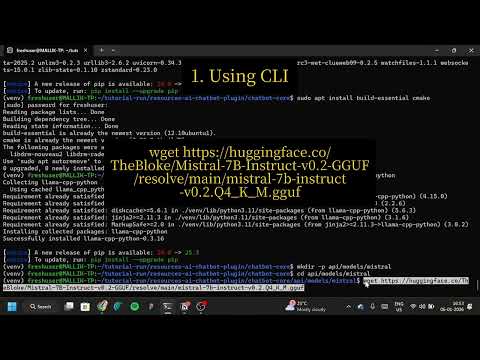
The tutorial shows how to fork the repo, set up the backend, download the LLM model, run the frontend, and verify the chatbot works.
- Symptom: The application appears "stuck" or frozen during the first run of the data pipeline or API.
- Cause: The system is downloading the embedding model (
all-MiniLM-L6-v2, ~80MB) or initializing the LLM. - Solution: This is normal behavior for the first run. Please wait for a few minutes. Ensure you have a stable internet connection.
- Installed plugin cannot connect: Confirm that the FastAPI service is running with
make api, then check the backend URL under Manage Jenkins > System. The configured URL must be reachable from the Jenkins instance.
- Symptom:
SyntaxErrororModuleNotFoundErrorduring setup or execution. - Solution:
- Ensure you are using Python 3.11+. Verify with
python --version. - Ensure the virtual environment is activated:
source chatbot-core/venv/bin/activate
- Ensure you are using Python 3.11+. Verify with
- Memory Limits: If the process is killed (e.g.,
OOM Killed), ensure your machine has sufficient RAM (at least 8GB recommended for full mode). Try running in Lite Mode (make dev-lite) first. - Missing Dependencies: If you see import errors, re-run dependency installation:
pip install -r chatbot-core/requirements.txt
- llama-cpp-python installation fails: Ensure build tools (gcc, cmake) are installed. See the setup guides for platform-specific instructions.
To confirm your local setup is correct:
- Virtual Environment: Ensure
(venv)appears in your terminal prompt. - Lite Mode Check: Run
make dev-lite. It should start without errors. - API Check: Run
curl -X POST http://127.0.0.1:8000/api/chatbot/sessions. It should return a default session response.
For more details, see the setup guides.
Development-related documentation can be found in the docs/ directory.
- Setup Guides
- Windows/WSL2 Setup Guide — for contributors on Windows machines
- macOS/Apple Silicon Setup Guide — for contributors on Mac M1/M2/M3
Refer to our contribution guidelines
Licensed under MIT, see LICENSE