The Enterprise App Store is your customizable internal mobile app store, enabling seamless enterprise distribution of Android APK/AAB and iOS IPA files.
- Customizable Storefront: Distribute your in-house apps with a fully customizable mobile storefront.
- Secure Distribution: Everything you need for secure, streamlined distribution of your in-house apps.
- No MDM Required: Allows distribution of B2B and B2E applications without the need for an MDM solution and enrollment.
Learn more about Appcircle Enterprise App Store.
What Sets Apart Appcircle Enterprise App Store
- Direct File Sharing:
- Skip Traditional Stores: Share .IPA, APK, or AAB files directly, avoiding the need to wait for Apple App Store or Google Play approvals.
- Flexible Sharing Options:
- Beta and Live Channels: Share your app on the Beta channel for testing new features or identifying bugs, or on the Live channel for stable versions.
- Unlisted Publishing: Publish an app version as unlisted to make it accessible only through a direct link, without appearing in the store's app list.
- Enhanced Security:
- Secure Authentication: Access the Enterprise App Store with extra secure authentication using Enterprise Authentication Methods.
- Controlled Access: Ensure that only authorized users can access the app store and its contents.
- Customizable Mobile Storefront:
- Tailored Experience: Provide a customizable mobile storefront for your in-house apps, ensuring a tailored experience that aligns with your brand and user needs.
- No MDM Requirement:
- Simplified Distribution: Distribute B2B and B2E applications without the need for a Mobile Device Management (MDM) solution or enrollment, reducing complexity and costs.
- Streamlined Workflow:
- Seamless Integration: Integrates smoothly with your existing workflow, making it easy to manage and distribute apps within your organization.
- Efficient Management: Track and manage applications, versions, testers, and teams effectively, ensuring a smooth distribution process.
- Re-Sign and Auto-Resign:
- Update Without Rebuilding: Re-sign iOS and Android binaries with updated signing identities, manually or automatically, and keep distributing without a new build.
These features make the Appcircle Enterprise App Store a powerful tool for securely and efficiently distributing in-house applications, offering flexibility, enhanced security, and a streamlined workflow.
Enterprise App Store
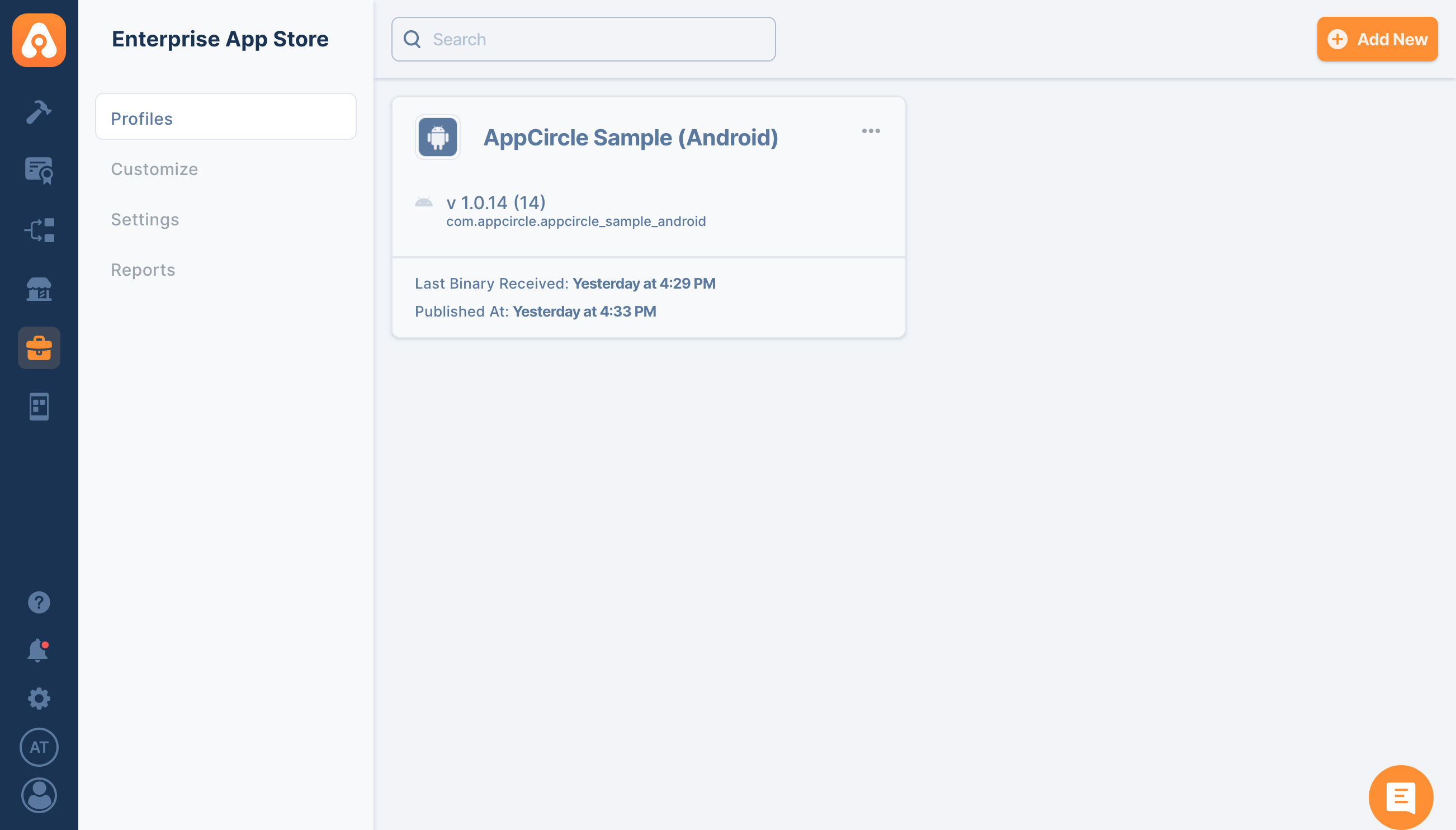
After uploading your build successfully, you will see your app in the "Enterprise App Store" module like below
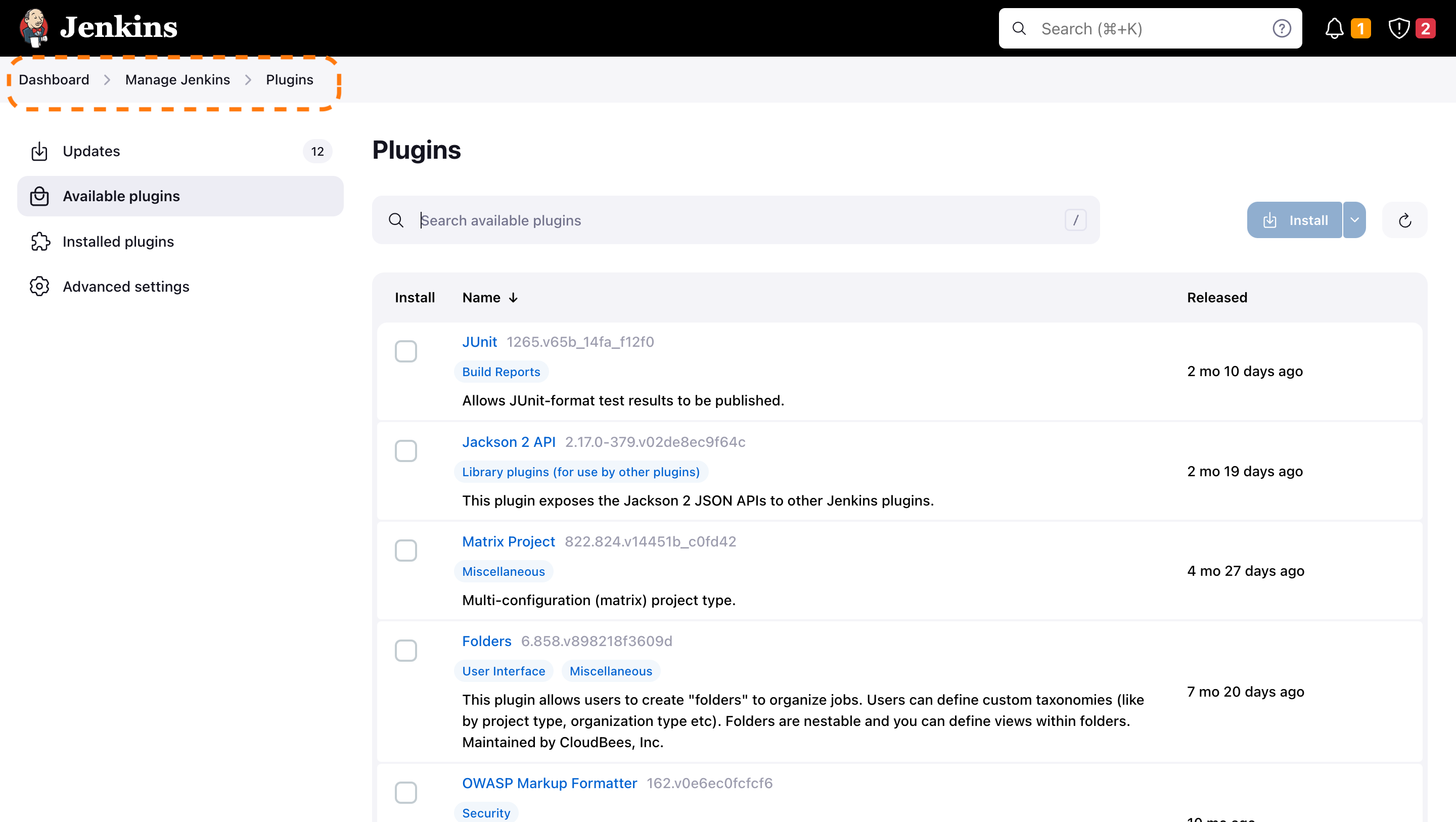
Install Appcircle Enterprise Store Plugin
Go to your Jenkins dashboard and follow, Manage Jenkins > Plugins and search for "Appcircle Enterprise Store"
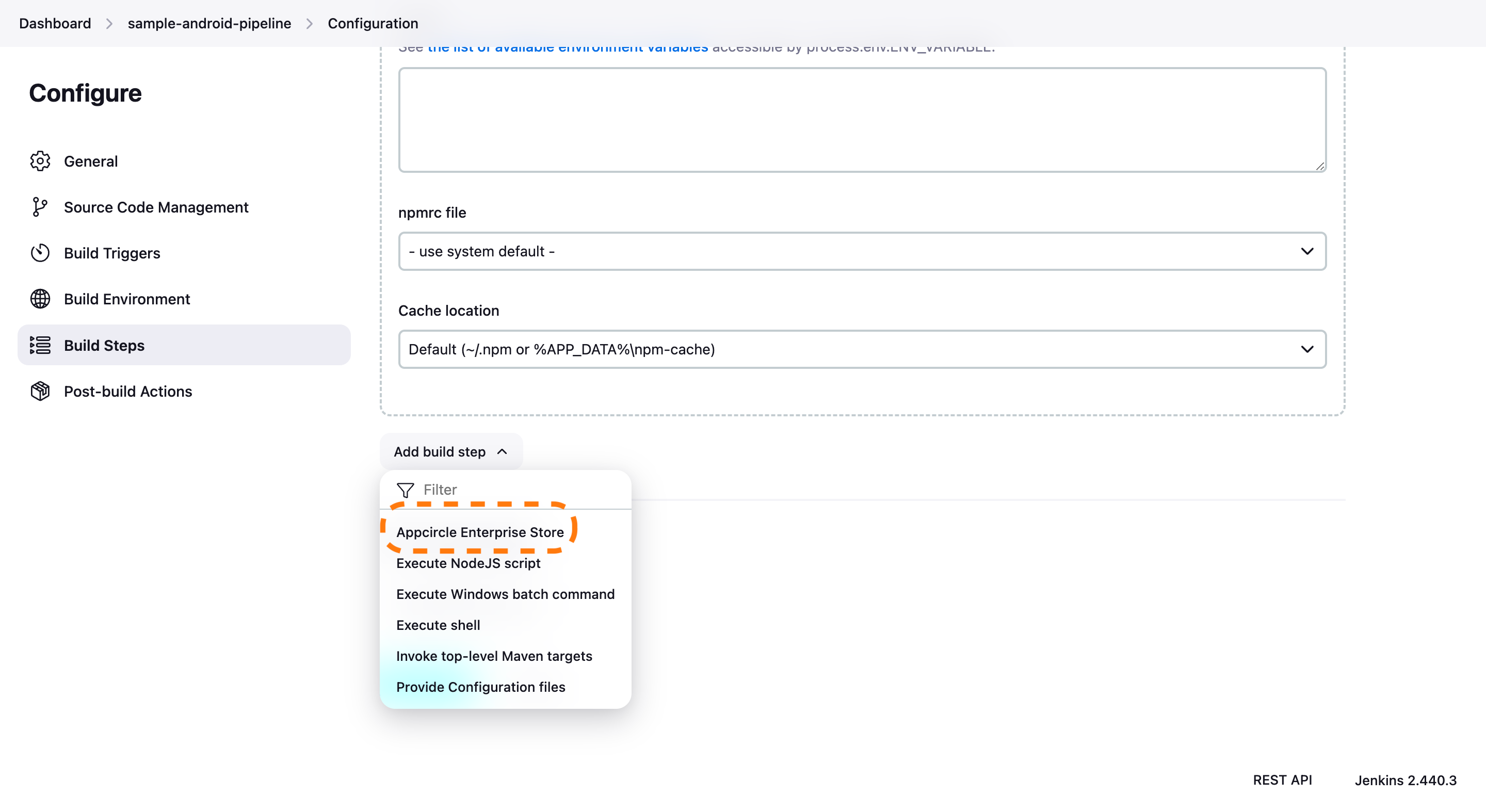
Add Plugin in Build Steps
Go to your configuration page of the project add a build step.
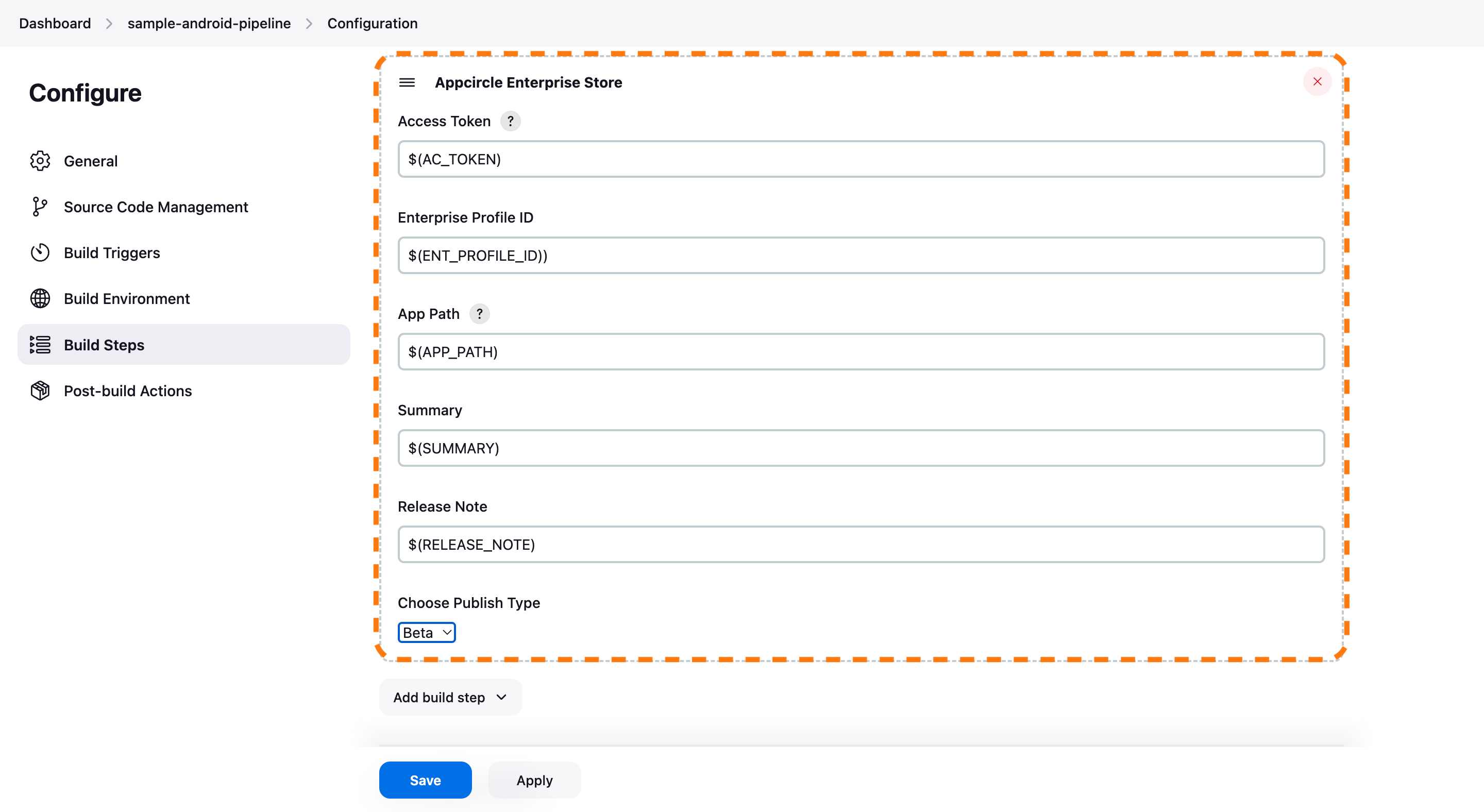
Configure Plugin
After adding the plugin into your build steps make sure you fulfill required inputs. Also, do not forget to add the plugin after your build steps. Because you will be asked to provide the build path.
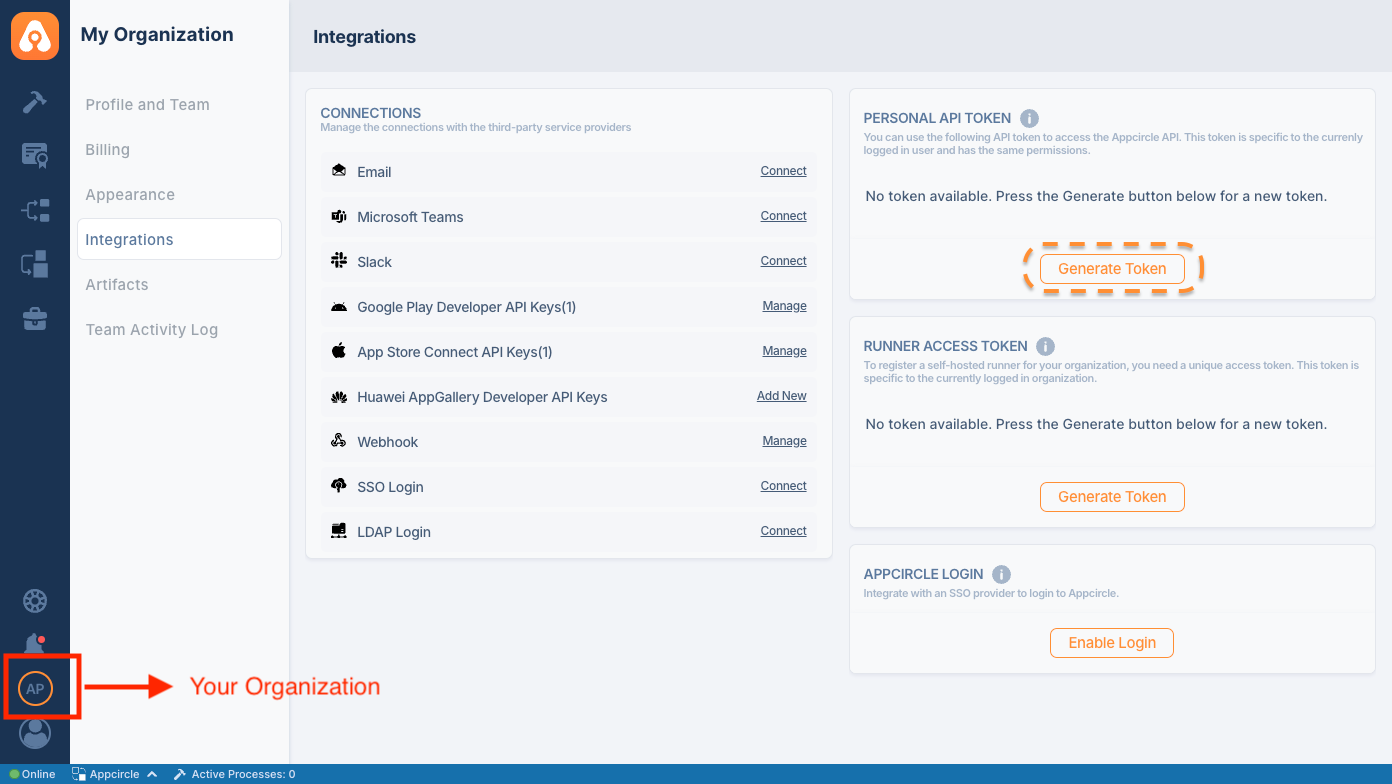
Generating/Managing the Personal API Tokens
To generate a Personal API Token, follow these steps:
- Open the My Organization screen from your profile avatar at the bottom left.
- Go to the Security section and find the Personal Access Key card.
- Press Generate Key to generate your token.
Using Plugin into Your Script
   stage('Publish') {
      environment {
         AC_PAT = credentials('AC_PAT')
      }
       steps {
          appcircleEnterpriseAppStore personalAPIToken: AC_PAT,
                  appPath: '$APP_PATH',
                  releaseNote: '$RELEASE_NOTE',
                  summary: '$SUMMARY',
                  publishType: '$PUBLISH_TYPE' // "0": None, "1": Beta, "2": Live
       }
   }
Self-Hosted Appcircle
If you run a self-hosted Appcircle installation, point the plugin to your own servers with the optional
authEndpoint and apiEndpoint parameters. When omitted, the plugin uses the Appcircle cloud defaults
(https://auth.appcircle.io and https://api.appcircle.io), so existing cloud configurations keep working
without any change.
   appcircleEnterpriseAppStore personalAPIToken: AC_PAT,
           appPath: '$APP_PATH',
           releaseNotes: '$RELEASE_NOTES',
           summary: '$SUMMARY',
           publishType: '$PUBLISH_TYPE',
           authEndpoint: 'https://auth.your-appcircle-domain.com',
           apiEndpoint: 'https://api.your-appcircle-domain.com'
authEndpoint: Base URL of the self-hosted Appcircle authentication server. Optional; defaults tohttps://auth.appcircle.io.apiEndpoint: Base URL of the self-hosted Appcircle API server. Optional; defaults tohttps://api.appcircle.io.
Self-signed or private CA certificates: If your self-hosted Appcircle server presents a self-signed certificate (or one issued by a private/internal CA), the plugin's HTTPS requests will fail certificate validation. The plugin does not disable TLS verification. To use it, add the server's CA certificate to the trust store of the JVM running Jenkins, for example import it into the JDK
cacertswithkeytool, or start Jenkins with-Djavax.net.ssl.trustStore=/path/to/truststore.
Reference
-
For details on generating an Appcircle Personal API Token, visit Generating/Managing Personal API Tokens
-
To learn more about the Appcircle Enterprise App Store, please refer to Appcircle Enterprise App Store
-
For the full plugin setup guide, see the Appcircle Enterprise App Store documentation
Issues
Report issues and enhancements at info@appcircle.io
LICENSE
Licensed under MIT, see LICENSE